Ubiquitous Interfaces, Ubiquitous Functionality

Lately some of us at Mozilla Labs have been experimenting with graphical keyboard user interfaces in Firefox. Our current work-in-progress is something that we’re calling Ubiquity for the time being, though the name is by no means set in stone.

This project is heavily informed by Enso, a software product developed by me and my colleagues at Humanized from 2005-07. Aside from the benefits outlined in Alex Faaborg’s blog post entitled The Graphical Keyboard User Interface, this experiment is intended to solve few other problems, one of which I’ll address in this post.

Web applications, much the same as desktop applications, are a bit like isolated cities: it’s difficult for an end-user to arbitrarily share data and functionality between them. This is alleviated to some extent by creations like Firefox Add-ons that add toolbars or sidebars to Firefox’s UI, Bookmarklets, and Greasemonkey, but while all of these solutions are powerful, each comes with its own set of problems. The buttons and bars of many Firefox add-ons don’t scale well because of the valuable screen real-estate they consume; Bookmarklets are restricted in scope because they only have the access privileges of the website they’re running on; and Greasemonkey doesn’t prescribe any kind of interaction model, which makes it difficult to reuse the functionality of a script in a context other than the ones it was expressly designed for.

Our new project attempts to alleviate all of these problems by allowing end-users to apply textual commands, or verbs, to whatever they’re looking at. For instance, let’s assume that I’ve found a typo on a friend’s blog, and I want to let him know about it. I can first select the typo on the page by dragging my mouse over it:
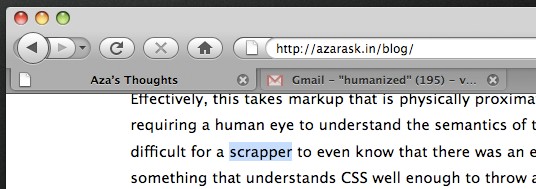
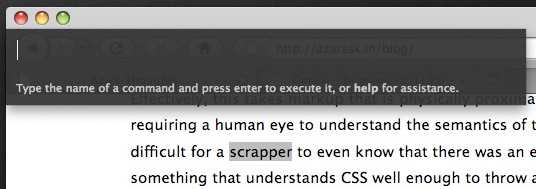
Then, I can activate what we’re calling the “command entry mode”. At the moment, this is done via a hotkey that displays a popup window, though this particular interface is only temporary (more on that later):
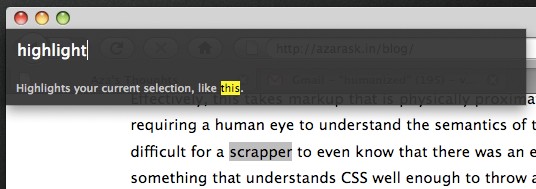
Now I type “highlight”, because that’s what I want to do to the typo, to emphasize the location of the typo to my friend:
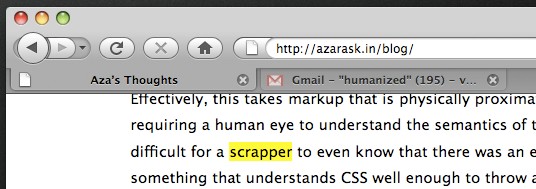
I then press enter, which highlights the text, like so:
Now I’d like to email part of the sentence containing the highlighted typo to my friend, so that he has some context for where the typo is located. I do this by highlighting part of the sentence, and issuing the “email” command. This causes Firefox to switch to my Gmail tab and compose an email for me with some pre-filled content:
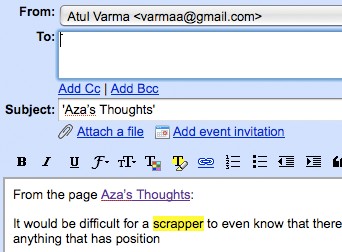
I can now modify the email as necessary to tell my friend about his typo, and then send it.

Our current code is capable of performing this workflow, though Gmail is the only supported mail application at the moment. The hotkey interface is also something of a placeholder, because it was the most expedient to implement while making the project dogfoodable. Ultimately, it would be ideal for verbs to be exposed to end-users through interfaces that already exist in Firefox, such as the AwesomeBar or contextual menus.

Exactly what the user needs to type in order to invoke a command is also under contention, and Jono has been doing some really interesting work on this front. There’s a number of additional aspects of the experiment that I’d like to write about, so keep reading Toolness for more updates.

We’re currently sprinting to have something more presentable by the Firefox Summit—hopefully a 0.1 release, if all goes well. In the meantime, if you’re interested, feel free to join the Google Group, and even check out the source code.

30 Responses to “Ubiquitous Interfaces, Ubiquitous Functionality”

  1. Aurelien Tabard Says:

    Hi,
    are you aware the Inky project by Rob Miller’s team at MIT ?
    In case you didn’t hear about it :

    “Inky (short for Internet Keywords) is a Firefox extension that provides a sloppy command line for the web.”
    http://groups.csail.mit.edu/uid/inky/index.html

    The UIST 2008 paper (probably not the final version) :
    http://groups.csail.mit.edu/uid/projects/inky/uist08-inky.pdf

    an older web page :
    http://groups.csail.mit.edu/uid/projects/inky/

    Regards
    Aurélien

  2. about:mozilla » Ubiquitous interfaces, ubiquitous functionality Says:

    [...] Atul Varma and a few other folks on the Mozilla Labs team have been experimenting with graphical keyboard user interfaces in Firefox. Their current work-in-progress is codenamed “Ubiquity”, and is heavily informed by Enso, a software product developed by some of the team members when they were at Humanized. In addition to the benefits outlined in Alex Faaborg’s blog post “The Graphical Keyboard User Interface“, the Ubiquity experiment is intended to solve a few other problems, which Atul further discusses in his blog post. [...]

  3. Marco Gomes Says:

    There is PodiPodi too, very similar:
    http://www.podipodi.com/

    Sorry for bad english,
    from Brazil, Marco Gomes
    CTO of the boo-box team
    http://boo-box.com

  4. rektide Says:

    Gnome Do is a contextual launcher utility; this seems like a browser specific complement. I’d be interested to see the various forms of context that can be captured or acted on; the example here focuses around actions on selected text, and I’m wondering if it goes deeper.

    I think a screencast would be easier to understand than reading along.

  5. Tobias Says:

    Great idea. I would love to use it in a future version. It will be very powerful when there is some kind of plugin-system for commands so everybody can extend it.

  6. Ubiquity, commandline power applicato a Firefox | Il blog che non c'è Says:

    [...] di approfondimento: Ubiquitous Interfaces, Ubiquitous Functionality Link per il download di Ubiquity Gruppo di discussione (io sul server nttp di Mozilla non lo trovo) [...]

  7. readwriteweb web2.0 Ubiquity For Firefox Is Not An Add-On - It’s a Whole New UI | Says:

    [...] The Ubiquity project aims to solve problems involving today’s web applications and how we interact with them. Atul Varma describes this on his blog: [...]

  8. Trusting Functionality at Toolness Says:

    [...] of the major challenges we face with the design of our new linguistic command-line project is that of trust. As Zittrain mentions in The Future of the Internet, this is really the [...]

  9. reading: Ubiquity For Firefox Is Not An Add-On - It’s a Whole New UI - andre-friedrichs.com Says:

    [...] The Ubiquity project aims to solve problems involving today’s web applications and how we interact with them. Atul Varma describes this on his blog: [...]

  10. Aza’s Thoughts » Sharing Streamable Functionality Says:

    [...] for the Web. But as we began to think about how to share new functionality for the browser (read Ubiquity commands, as well as the broader spectrum of Firefox add-ons), we realized that the basic URL was [...]

  11. shunting Says:

    I love the idea, but on FF 2.0.0.6 with OS X Server 10.4.11 from command space I get a uniquity pop-up menu and no command line (though I get a black box at the top of the screen).

  12. Our Presentation at Labs Night « Not The User’s Fault Says:

    [...] still in the very early stage of development, but those are our plans, in a nutshell. Atul gives a much better explanation than I [...]

  13. Towards Inter-Community Trust at Toolness Says:

    [...] a remote service to query whether or not a particular user has commit privileges. This would allow Ubiquity’s source control system—which isn’t hosted on hg.mozilla.org—to instantly [...]

  14. Mozilla Lab 项目:Ubiquity < MJiA Says:

    [...] 究竟什么是UI和UE上的普适呢,不知道大家对QuickSivler或者Gnome DO是否熟悉,在Windows平台上也有相应的项目,更有Aza Raskin(Jef Raskin之子,Jef Raskin是谁你不会不知道吧)的作品Enso,我想我可能也说不清楚究竟什么是UI或UE上的普适,我想这篇Atul的博客能够解释一些──“普适的用户界面,普适的功能”。这里需要解决的问题是,拿Firefox举例,Firefox本身提供一个扩展性极好的插件体系,社区中也已经拥有了5000+的附加组件提供给用户,而每一个附加组件都会为Firefox的功能,用户图形界面等方面添加很多功能,假设我添加了20个附加组件,并且这20个附加组件都为GUI添加了内容,那我的Firefox会成什么样子呢。或者说现在流行各种toolbar,如果我把全世界的toolbar都装上,那我的浏览器会成为一个什么样子──记得以前Todd做过这个实验,:)。或者大家可以打开word,你会不会觉得上面的各条toolbar很恐怖,对于新版2007的word,我基本不会用~~ [...]

  15. Rory Says:

    Isn’t this more or less exactly what the vimperator plugin does? Except based on a pre-existing well known set of commands (vi commands), and with extreme configurability.

  16. Patrick Says:

    This is a really interesting pursuit and leads deep into the waters of ontology. I have been working on this idea of verbs and nouns through my project truthstructures. Its a much higher level of what computer “use” might be when it becomes a collabortative and simultaneous act. Please do read more about it here, I think we have a lot of common pursuits:

    http://docs.google.com/Doc?docid=acv93nf7c8gv_12fp8hfw&hl=en

  17. Fatsoe Says:

    i can exactly do the same with custom keywords and bookmarklets… but it’s a great idea anyway! the only thing i don’t like it’s the name of the project :) with the other mozilla labs projects such as snowl, prism, weve, this ubiquity seems something… ugly for me :D

  18. Frank Chen Says:

    Very interesting idea. But I was wondering whether internationalization or localization issues have been considered in the interface. Will the commands be in Japanese, Chinese, Dutch or other languages?

  19. Development in a Blink » Blog Archive » Firefox Ubiquity, a command line browser interface Says:

    [...] Ubiquitous Interfaces, Ubiquitous Functionality Attempts to alleviate […] problems by allowing end-users to apply textual commands, or verbs, to whatever they’re looking at. [...]

  20. Home Biss Says:

    Ubiquity for Firefox: Controlling the Web with language…

    Ubiquity is truly out of this world! If this new concept really takes off, you can bet that it would change and revolutionize the way we use web browsers today!…

  21. Decklin Foster Says:

    Have you looked at Conkeror? Like Emacs, it uses M-x for a sort of “command line”. There is even a GMail major-mode, although I don’t think it does anything like this (yet).

    It’s probably not a replacement for where you want to go with Ubiquity, but I think it is maturing into a useful complement for the sort of users who prefer Emacs (or other Unix-geeky things).

    Seems like everything old really is new again :-)

  22. Fizbin Says:

    Looks like there are a collection of comparable command line efforts. If you look at Google Project 0 and IBM’s sMash, you’ll see that they have a palette and a drag-and-drop/wire-together interface. A similar interface here might be useful. If you allow command line would it be useful to allow a certain level of nesting? e.g. email {map Pepsi Center Denver, CO} foo@bar.com

  23. jason Says:

    Seems like Quicksilver for Firefox?

    Would be a great idea since I love Quicksilver and using awesome keyboard shortcuts to do everything in FF would be good.

  24. Craig Says:

    I hope that these new ways of interacting with our computers don’t get corrupt by the unix mentality of cryptic verb words, that are only one to five characters long. There needs to be a balance of speed verses usability verses new uses verses old people who take the time to spell out full words. :)

  25. Ubiquity « Sinnstilstand Says:

    [...] digi.no — Atul’s blog — Mozilla — Ars Technica Med prototypen får man kommandoer knyttet til kjente [...]

  26. SoulRaver Says:

    Hi,

    Awsome initiave. I personally would LOVE to see one feature added:

    A pasted text from a site (URL or not) gets force executed as “Go to address in FF”.

  27. SortiPreneur Says:

    Intelligence and Context to the Browser…

    I have been extremely busy with work over the past few weeks and have not been blogging as regularly as I’d like to. This period has unfortunately coincided with two developments that I regard as very critical milestones in the…

  28. Richard Garside Says:

    I’d love to see better support for Microformats. For example when I type ‘add-to-calendar’ on a page with calendar microformats, it would be brilliant if they appeared in the suggestion list.

    You could do similar things for places and maps, and for people and contacts.

  29. What I’ve always wanted | SnapDragon Consultants Blog Says:

    [...] Our new project attempts to alleviate all of these problems by allowing end-users to apply textual commands, or verbs, to whatever they’re looking at. (Toolness) [...]

  30. iSpeech Text to Speech API Says:

    I think I saw you tweet about needing a text to speech API?
    Check out ours. We have a free version you can use too.
    Feel free to contact us!

    Best,
    Heath